Hi Folks,
I am back again, sorry it took me more than one month to get the next post on this series. But I was not idle, planning and building some new and important feature to my tool is what I was involve into.
This is fourth post in series of ‘CoreSync - Sync Sitecore Content’. Today we will walk through adding new processor 'Create ', let's go and deep dive what we have done to achieve this feature.
Similar to what we have done last time, I have introduced new config section which has new processors.
No need to iterate that processor listed in above diagram will execute in order they written. Now it all start with the request to web service where I need to identify if this request is for my 'Advance Create' or normal create operation.Yes I did retain the legacy way of creating item in Sitecore as I find out still relevant in some cases. For Create request the verb used is 'post' by Sitecore and in this case I don't want to introduce a new verb as not to make more complex so I using simple query string mechanism by which I identify if the request is for default create call or advance create. Here the RetainID is the query string parameter which simply predict that do you want to create a Item while retaining it's GUID. In Figure 4.2 you can see the same thing.
Now what is recipe to create a item while retaining the GUID ?
Answer is Simple and I don't need to look very far, it is Serializing and De-Serializing, Sitecore does it always when you do create Sitecore package and install the same, so in my recipe the only addition is that i give a capability to do the same using a web service way. By the way same thing has been done in Sitecore Rocks Web Service and TDS's Razl Service, but both of them are proprietary and I don't like there way as I think it is little complex. In detail my advance create works in following way once it identify that the request is for advance create:
Create a Request
a) Serialize your Item into textual data using Sitecore API and encrypt it, so that is secure over wire.
b) If Sitecore Item is a Media Item than convert that into binary blob.
c) Create a Form Post Request to service where you pass the meta data(load options) of Sitecore Item, encrypted textual data and any additional binary data as file upload and then finally post it.
Process a Request
d) Read the Form Data and look for meta data, encrypted textual data and if any additional binary data.
e) Decrypt the data and de-serialize it in order to load the item in memory to create it in Sitecore.
f) If item creation is successful than return the ID of newly created item so that requester can verify with original ID.
I will not post here lot of snaps but following is the key function which does the decryption and get the in-memory representation of item and pass it to create advance pipeline for actual creation in the Sitecore target Database.
You can find more detail from the hosted code in GitHub.
While point to note is I did use most of Sitecore API to serialize and de-serialize items but wherever I found they have not exposed there methods publicly i have re-written them and even corrected one small bug also which make de-serialization smooth and consistent.
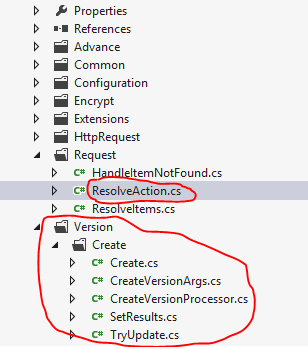
As you can see in Figure 4.4 there are number of classes mostly under Create folder which do come use for create advance processor.
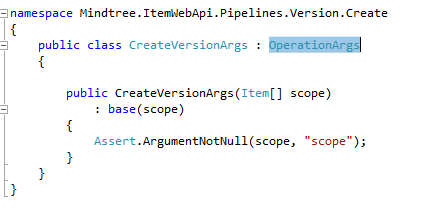
Important class to note is SerializeManager using which I De-Serialize the LoadOptions and Item classes. For Serialization I used default Sitecore API.
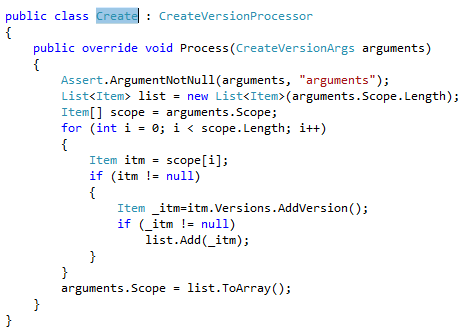
In Figure 4.5 you can see the actual creation take place.
This new capability is important as it gives opportunity to create any CRUD based application a ground on Sitecore to be created as this is a WebService and can be call from anywhere.By the way this follow all basic principles of Item Creation which were same while creating existing Item in new system using Sitecore package like Security, etc.,
Creating all this new pipelines will not be easy if I would not able to test them easily, so as i mentioned earlier in my first post I used following .NET wrapper which allow me use these service, but he developed it for existing Sitecore ItemWebAPI service so in order to use it for my own new and modified Item WebAPI processor I need to extend it.
I will not write a post to explain what amendments i bring to that wrapper but I will publish that also, so that original author can verify that did i do justice with his work.
In last Post I will explain the new tool which use these pipelines to cater the problem of content backup and restoration. The code for that tool will not be available as of now but tool itself will be available to use publicly.
In end please let me know how I am doing on extending Sitecore ItemWebAPI utility.
I am back again, sorry it took me more than one month to get the next post on this series. But I was not idle, planning and building some new and important feature to my tool is what I was involve into.
This is fourth post in series of ‘CoreSync - Sync Sitecore Content’. Today we will walk through adding new processor 'Create ', let's go and deep dive what we have done to achieve this feature.
 |
| Figure 4.1 |
No need to iterate that processor listed in above diagram will execute in order they written. Now it all start with the request to web service where I need to identify if this request is for my 'Advance Create' or normal create operation.Yes I did retain the legacy way of creating item in Sitecore as I find out still relevant in some cases. For Create request the verb used is 'post' by Sitecore and in this case I don't want to introduce a new verb as not to make more complex so I using simple query string mechanism by which I identify if the request is for default create call or advance create. Here the RetainID is the query string parameter which simply predict that do you want to create a Item while retaining it's GUID. In Figure 4.2 you can see the same thing.
 |
| Figrue 4.2 |
Answer is Simple and I don't need to look very far, it is Serializing and De-Serializing, Sitecore does it always when you do create Sitecore package and install the same, so in my recipe the only addition is that i give a capability to do the same using a web service way. By the way same thing has been done in Sitecore Rocks Web Service and TDS's Razl Service, but both of them are proprietary and I don't like there way as I think it is little complex. In detail my advance create works in following way once it identify that the request is for advance create:
Create a Request
a) Serialize your Item into textual data using Sitecore API and encrypt it, so that is secure over wire.
b) If Sitecore Item is a Media Item than convert that into binary blob.
c) Create a Form Post Request to service where you pass the meta data(load options) of Sitecore Item, encrypted textual data and any additional binary data as file upload and then finally post it.
Process a Request
d) Read the Form Data and look for meta data, encrypted textual data and if any additional binary data.
e) Decrypt the data and de-serialize it in order to load the item in memory to create it in Sitecore.
f) If item creation is successful than return the ID of newly created item so that requester can verify with original ID.
 |
| Figure 4.3 |
You can find more detail from the hosted code in GitHub.
While point to note is I did use most of Sitecore API to serialize and de-serialize items but wherever I found they have not exposed there methods publicly i have re-written them and even corrected one small bug also which make de-serialization smooth and consistent.
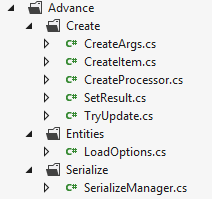 |
| Figure 4.4 |
Important class to note is SerializeManager using which I De-Serialize the LoadOptions and Item classes. For Serialization I used default Sitecore API.
In Figure 4.5 you can see the actual creation take place.
This new capability is important as it gives opportunity to create any CRUD based application a ground on Sitecore to be created as this is a WebService and can be call from anywhere.By the way this follow all basic principles of Item Creation which were same while creating existing Item in new system using Sitecore package like Security, etc.,
Creating all this new pipelines will not be easy if I would not able to test them easily, so as i mentioned earlier in my first post I used following .NET wrapper which allow me use these service, but he developed it for existing Sitecore ItemWebAPI service so in order to use it for my own new and modified Item WebAPI processor I need to extend it.
I will not write a post to explain what amendments i bring to that wrapper but I will publish that also, so that original author can verify that did i do justice with his work.
In last Post I will explain the new tool which use these pipelines to cater the problem of content backup and restoration. The code for that tool will not be available as of now but tool itself will be available to use publicly.
 |
| Figure 4.5 |