Showing posts with label item webapi. Show all posts

18 February 2015

CoreSync - Sync Sitecore Content - Item Web API - Create Advance - Part -4

Hi Folks,

I am back again, sorry it took me more than one month to get the next post on this series. But I was not idle, planning and building some new and important feature to my tool is what I was involve into.

This is fourth post in series of ‘CoreSync - Sync Sitecore Content’. Today we will walk through adding new processor 'Create ', let's go and deep dive what we have done to achieve this feature.
Figure 4.1
Similar to what we have done last time, I have introduced new config section which has new processors.
No need to iterate that processor listed in above diagram will execute in order they written. Now it all start with the request to web service where I need to identify if this request is for my 'Advance Create' or normal create operation.Yes I did retain the legacy way of creating item in Sitecore as I find out still relevant in some cases. For Create request the verb used is 'post' by Sitecore and in this case I don't want to introduce a new verb as not to make more complex so I using simple query string mechanism by which I identify if the request is for default create call or advance create. Here the RetainID is the query string parameter which simply predict that do you want to create a Item while retaining it's GUID. In Figure 4.2 you can see the same thing.
Figrue 4.2
Now what is recipe to create a item while retaining the GUID ?
Answer is Simple and I don't need to look very far, it is Serializing and De-Serializing, Sitecore does it always when you do create Sitecore package and install the same, so in my recipe the only addition is that i give a capability to do the same using a web service way. By the way same thing has been done in Sitecore Rocks Web Service and TDS's Razl Service, but both of them are proprietary and I don't like there way as I think it is little complex. In detail my advance create works in following way once it identify that the request is for advance create:
Create a Request
a) Serialize your Item into textual data using Sitecore API and encrypt it, so that is secure over wire.
b) If Sitecore Item is a Media Item than convert that into binary blob.
c) Create a Form Post Request to service where you pass the meta data(load options) of Sitecore Item, encrypted textual data and any additional binary data as file upload and then finally post it.
Process a Request
d) Read the Form Data and look for meta data, encrypted textual data and if any additional binary data.
e) Decrypt the data and de-serialize it in order to load the item in memory to create it in Sitecore.
f) If item creation is successful than return the ID of newly created item so that requester can verify with original ID.

Figure 4.3
I will not post here lot of snaps but following is the key function which does the decryption and get the in-memory representation of item and pass it to create advance pipeline for actual creation in the Sitecore target Database.
You can find more detail from the hosted code in GitHub.
While point to note is I did use most of Sitecore API to serialize and de-serialize items but wherever I found they have not exposed there methods publicly i have re-written them and even corrected one small bug also which make de-serialization smooth and consistent.
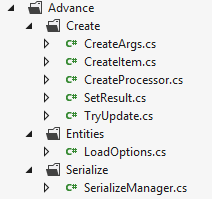
Figure 4.4
As you can see in Figure 4.4 there are number of classes mostly under Create folder which do come use for create advance processor.
Important class to note is SerializeManager using which I De-Serialize the LoadOptions and Item classes. For Serialization I used default Sitecore API.
In Figure 4.5 you can see the actual creation take place.
This new capability is important as it gives opportunity to create any CRUD based application a ground on Sitecore to be created as this is a WebService and can be call from anywhere.By the way this follow all basic principles of Item Creation which were same while creating existing Item in new system using Sitecore package like Security, etc.,
Creating all this new pipelines will not be easy if I would not able to test them easily, so as i mentioned earlier in my first post I used following .NET wrapper which allow me use these service, but he developed it for existing Sitecore ItemWebAPI service so in order to use it for my own new and modified Item WebAPI processor I need to extend it.
I will not write a post to explain what amendments i bring to that wrapper but I will publish that also, so that original author can verify that did i do justice with his work.
In last Post I will explain the new tool which use these pipelines to cater the problem of content backup and restoration. The code for that tool will not be available as of now but tool itself will be available to use publicly.

Figure 4.5
In end please let me know how I am doing on extending Sitecore ItemWebAPI utility.

15 January 2015

CoreSync - Sync Sitecore Content - Item Web API - Create Version - Part -3

This is third post in series of ‘CoreSync - Sync Sitecore Content’. Today we will walk through adding new processor 'Create Version', let's go and deep dive what we have done to have this feature.

Figure -1.1
As you can see we have introduced new config section entries which has three new processor.
To handle these new processor we need two important things first is ability to identify the version request then launch relevant pipeline. Second is right appropriate classes(Processors) which constitute that pipeline.
Figure -1.2

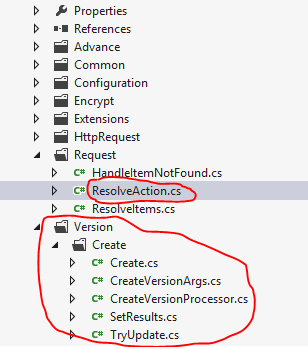
As you can see in Figure 1.2 Resolve action is the class which handles our create version requests and highlighted classes do the rest of work. The sequence is important in processor listing In Figure 1.1 which tells Sitecore to run those classes in same manner. In Post 2 Figure 1.5 we have shown that we have introduced a new verb 'ver' and handled the same by calling a new method 'ExecuteCreateVersionRequest(requestArgs)'.
In this method I need to identify first if the request is for Media Item, if it is then I need to handle it differently. So, I handled the create version request for Media Item in same 'CustomResolveAction' class. People may ask why you have not created a separate processor for it ? But I just followed the way it was handled for create media request by Sitecore itself, So I just followed the suit.
In 'CreateMediaVersionItems' function I just need to few formality first and then check if web request has the file, if it does then add the version to the media item and then upload the media file to new version of media item, it also update media item properties like height, width, alternate text if provided in the post back Form values.

While you go through my source code you will notice most of the time I have written re-usable functions in type 'Mindtree.ItemWebApi.Pipelines.Common.Functions'. Apart from that in order to improve performance of my code I have used .NET based Memory Cache, which have default hold up time of 30 minutes which can be configured using the config. I am sure The Caching and this Functions class you folks will like as it has day to day many usefull utility functions like resolving database, item, language, version etc., It also has the number of History engine functions which we have used in our CoreSync Interfaces. The common namespace also had other utility classes which may be useful to you folks also.

But what if the request if for non-media item, I mean general sitecore item. For that we need to call our new pipeline, but before doing that I need to make sure that 'CreateVersionArgs' is fully loaded with values like scope variable which actually hold the item which need to be versioned. Following is the magic line which call our new pipeline and initiate the processor :

CorePipeline.Run("itemWebApiCreateVersion", createVersionArgs);


Figure -1.3
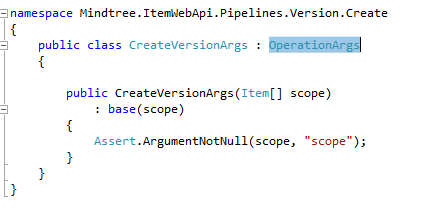
To create appropriate processor as listed in the config I need to create two base classes which will be useful while create main processor class. First is 'CreateVersionArgs' class which has been inherited 'OperationArgs' class, this helps pass the arguments to the pipeline. I didn't need to add much to this class.

Figure -1.4
Second class is 'CreateVersionProcessor' which is inherited from 'OperationProcessor' taking parameter of type 'CreateVersionArgs' class.


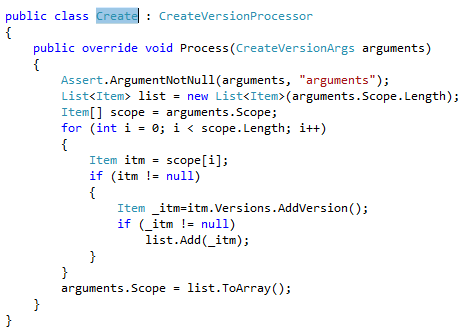
The real job of creating version happened in newly created type 'Mindtree.ItemWebApi.Pipelines.Version.Create.Create' where is fetch the item from the scope and simply called an Sitecore API to add version and then pass it further to update values incase the request has updated fields.
Figure -1.5
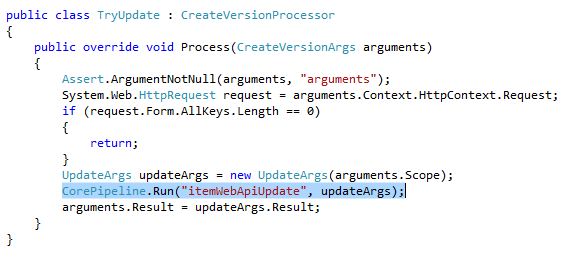
To update values the next processor is TryUpdate which will try to update but in turn it just call the 'itemWebApiUpdate' using following code.
CorePipeline.Run("itemWebApiUpdate", updateArgs);
Figure -1.6

So now if you put all this in context then process of creating version is simple.
a. Filter version request uniquely by having a separate request verb.
b. Call your own method which can decide between media request and normal item request.
c. For media request expected behaviour should be same which is to create a numbered version and attach the new media file with its properties.
d. If not media request then pass to your new shiny pipeline which will create the numbered version.
e. Update the newly created version if it has new field values to update.
f. Set the result finally so that requester can be notified with result of the request.

No doubt that I am able to right all this classes by looking deep into Sitecore.ItemWebApi library.
In next post will be explaining another new Pipeline 'itemWebApiCreateAdvance' which has the capability to create Item while retaining GUID, this is most important addition to ItemWebApi, so stay tune for same.


02 January 2015

CoreSync - Sync Sitecore Content - Item Web API - Part -2

This is second post in series of ‘CoreSync - Sync Sitecore Content’. Today we will walk through the ‘Item Web API’ and figure out what we need to customize and what to introduce new in order to extend this web service.
Let’s state the clear objectives what we do extend in Sitecore Item Web API service, answers are as follows:
  • Add a processor which should allow to create the Item numbered or language versions.
  • Add a processor which should allow to create the new item while specifying the GUID for the new item.
Few Clarification, Here creation should work for any item means even Media items. Another important clarification about second point is it should not replicate the existing default Create processor but introduce new one so that item can be created still in old way wherever required.

Now as my objectives are clear, I need to first understand the existing code culture, details and flow. So that I can introduce the new processor on similar lines. To start doing it, service config file and tool ‘IL Spy’ come very handy. ‘Item Web API’ introduce couple of processor in ‘httpRequestBegin’ pipelines which make sure that how the upcoming request will be routed to further appropriate pipeline processors. So as shown in Figure 1.1, it is my first clue. I need to introduce new processor and need to evolve the way context properties resolves.
Figure -1.1


As you can see in Figure 1.1 highlighted in red rectangle, I commented out ‘Sitecore.ItemWebApi.Pipelines.HttpRequest.LaunchRequest, Sitecore.ItemWebApi’ and replaced it with my own processor ‘Custom.ItemWebAPI.Pipelines.HttpRequest.LaunchRequest, Custom.ItemWebAPI’. Figure 1.2 which tells what I replaced in new class.


Figure -1.2


During the course of writing this customization I realize I need a way where I can have better way to resolve the routine context properties so for that I have created a public static class named ‘Functions’ in namespace ‘Custom.ItemWebAPI.Pipelines.Common’ which provide me the functions like GetItem(), GetLanguage() etc., These same functions I have used in the above class.

What is in this class?
  • You can find the code shared in GitHub. But for overview I write couple of overrides to GetItem() functions where I can get the item based on various parameters and you can call those as per your convenience.

But yet I didn’t find the way to resolve my new processor, so as stated in ‘LaunchRequest’ class I need to look into ‘itemWebApiRequest’ pipeline. Where I find my next clue, as you can see in below snap there are three processor which I replaced with my custom processor, the most important processor(highlighted in yellow rectangle in Figure 1.3) is ‘Custom.ItemWebAPI.Pipelines.Request.CustomResolveAction’ because here is the magic where I can introduce new processor (here it is called action like create, update etc.,).

Figure - 1.3


Rest of the processor I need to replace as I need to find the custom way to resolve items and pass necessary parameters to new processors. In ‘CustomResolveAction’ class I introduced couple of new functions which will suit my needs and also introduced new request verb for version processor (action). Also I need to have full media capabilities and enhanced the existing media update capability. Figure 1.4 which reflects the changes in comparison with old class structure.
Figure 1.4


Figure 1.5 shows how we had introduced new verb. We also need to distinguish new type of create facility where GUID can be retained and still need to persist existing create facility.

Figure - 1.5


Will explain in detail what I have written in above two new processor in detail and there concepts. Till then Happy New year & Happy Coding to all of my friends.

17 December 2014

CoreSync - Sync Sitecore Content - Introduction - Part -1

Hi folks,

It’s been long time since I have write something exciting which made this place boring. But no worries in last few months I have been involved in many challenges which appear when you do work in multisite scenario and that too on larger scale. Next series of post is all about how I solve one of the content administration challenge.

There is challenge when your development is in momentum where dev team release the build in every 2-3 months timespan while content authors on prod or staging environment continuously pouring in content for multiple website  and for there numerous localization etc., Which make such environments too crowdy and especially when your content authors may come from different organization, stakeholders and with different skill sets.

In such case taking the content backup is a very serious business.?
-         We all know there is no content backup tool out of the box provided by Sitecore or any other provider and taking DB backup is not a proper solution, let this discuss further.

-          Usual solution is to take DB backup like 6 times a day which is automated and in event of crisis restore those backups on some other machine and then use something to get the content back, but is this only or correct solution? 
      What you do in event of data loss, where you need to recover only particular content item or section of contents in one of the website and that too for particular locale?

-          By the way I mean by something 'underlined' is to use Sitecore packaging or other tools like Razl to sync the difference from backup to target Sitecore machine. But Razl is also not automated process and don't deal in detail.

So there are challenges which make it difficult to take backup selectively and restore the content with confidence and ease.
Now let’s look this problem in detail which is divided into two parts:
First is Backup 
       Need a tool which can back up the production content.
       On demand: Tool should be able to backup as an when required apart from scheduling capability.
       Detailed backup: Tool should be able to backup site/item level backup, which includes media item too. It should also be capable of taking required language level backup of a given item too.

Second is the Restoration.
       Need a tool which can restore available backup content.
       Simple and Efficient: Team should be able to restore with minimum overhead of time and complexity.
       Detailed restoration: Tool should be able to restore required site/item level content, which includes media item too. It should also be capable of restoring only required language level content without disturbing existing content for other locales

So I guess I made the problem statement very clear. The basic solution to this problem would be move the content from one location to another in bulk. The bold statement in previous sentence required CRUD operation in Sitecore at very efficient manner which can be automated also.

Here I guess Sitecore lack this capability OOB(Oh Sorry Packaging and serialisation is still there). But there is no service or tool which can sync the content across the Sitecore environments, but I think it is deliberately. So that this space can be filled by other vendors and community.
No surprise that even TDS was there from years and Sitecore Rocks(But does Sitecoe Rocks moving content at mass in production, no it is for developers) make into day to day affairs of developers but yet Sitecore didn't release its own SOA based interface which is fully capable. Here capability means whatever you can do using Sitecore Shell in terms of CRUD operations, you should be able to do the same using services.

If you look into Sitecore ASMX service, you will be able to do the general operation but lacks the sharpness and complete capabilities, same applies on Item Web API which is new kid on block. But I like this kid.

For example Item Web API does not support to create the versioned (Language or Numbered) item. The media item support is also not great with Item Web API. The biggest support I am looking, what If, if I want to create an Item while retaining the Item ID on the new Sitecore System. Such can only happen through two ways in Sitecore one is Plain Serialization or it’s another popular derivative which is Sitecore packaging.

Now to overcome these challenges I decide to extend the Item Web API in such a manner so that it can do lot more than what it made for. Though on choosing solutions I love Razl but I can’t extend it because it is third party software.

I guess have set the context of my next series of blog post where I will write how to extend Sitecore Web API. To consume that extended Web API I had extend already available client wrapper which helps to call the JSON/XML based service using .NET objects. I thanks Nick for his contribution.

Once you have the new service and new client available then you can build any interface which can take backup and restore the same from one system to another. Another point to make this new service exciting, it should have caching capability, Security feature like Encrypting and smart way to optimize the performance which will uncover in coming blog post. Following diagram showing an automated backup and manual restoration process should work.

CoreSync - Backup/Restoration Use Case

Remember this API will also open new avenues to move the content from one system to another without using Sitecore packaging, like moving content from content editor itself or from my favorite Sitecore Powershell extensions. You know if you are able to have this feature using Powershell then you can automate it and schedule it reliably out of Sitecore. 
People who directly want to dive in the code can directly look into GitHub repo here.